Should You Export Your Visual Novel to Ren'Py?
June 24, 2026

Once you make a visual novel in Novelez, it's surprisingly easy to get hooked. You set up a character, lay down the lines one by one, let a choice split the story in two… and after a while, a small finished work is sitting right there in your hands. And right about then, a certain thought tends to follow: "Could I actually keep this as a real game file on my own computer, instead of only viewing it in a browser?"
For the person who made it, that's a natural feeling. You spent hours on this story, and it stings a little that it seems to vanish the moment you close the browser tab. You want to hold it as a file, send it to a friend, maybe even put it out there someday.
We heard that, exactly. So we just opened up Ren'Py Export — a way to take the work you built in Novelez, with no code at all, and pull it out as a real, runnable game project. Today let's walk through what it is, how to use it, and why it's a bigger shift than it first looks.
🎮 First — What Is Ren'Py?
If this is your first time hearing "Ren'Py," here's the short version. Ren'Py is the free, open-source engine that indie creators around the world reach for most when making visual novels. A huge share of the well-known indie visual novels — the ones on Steam and itch.io — were built with it. It's been around a long time, it's stable, and in the visual novel world it's pretty much the standard.
But a good tool can still have a high doorstep. Making a Ren'Py game used to mean learning its own scripting syntax and typing the code yourself, line by line, in a text editor. When you're already stretched just drawing and writing, "now go learn something like programming" is where a lot of people quietly stopped. Honestly, the first time I saw a Ren'Py screen, my reaction was, "ah, this is for developers."
That's the gap Novelez now bridges. The work you build in Novelez, with no code, can be exported as a Ren'Py project with a single button. No tricky syntax, no complicated install. Easy to make, but the result is a genuine game-engine project. Those two finally connect in one straight line.
📦 How Do You Export It?
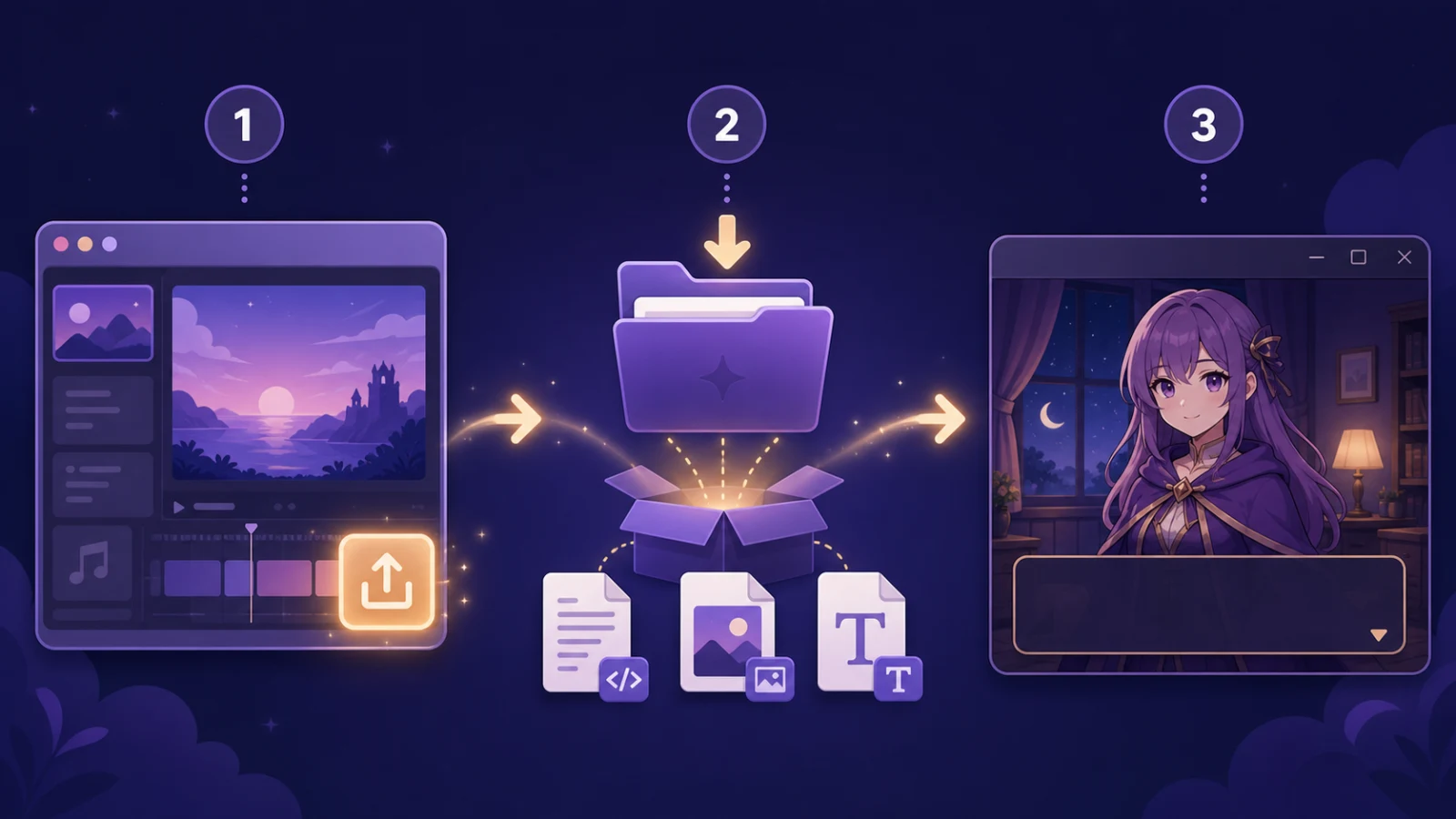
When you actually try it, it's far simpler than it sounds. The whole flow is just three steps.
1️⃣ Export from the editor — In your project's edit screen, hit "Ren'Py Export," and your project downloads as a single zip file. Click, wait a moment, done.
2️⃣ Unzip it — Unpack the file and you get a game folder. Inside is everything the game needs to run — the dialogue script, the screen and menu setup, the images, and even the font — all neatly in place. Nothing extra to round up.
3️⃣ Open it in Ren'Py — Grab the Ren'Py launcher (the official free app) once, drop the folder you just unpacked into your project list, and it's recognized right away. The moment you hit "Launch Project," your work pops up in a window and runs like an actual game.
You only install the Ren'Py launcher that first time; after that, export → open → run takes a few minutes. So don't tense up at the words "game development." You're not learning something new — you're just moving a story you already made into a new container called a game file.
🇰🇷 Your Korean Text Shows Up Clean, Not Broken
Here's one thing I really want to flag. When you turn a visual novel into a game, the sneaky — actually, very common — thing that trips people up is the font. If the game's default font doesn't support Korean, all those lines you carefully wrote come out as little boxes (□□□). "I clearly wrote it in Korean, but it's all broken when I run it" — trust me, that moment is genuinely deflating.
So Novelez's Ren'Py Export bundles a Korean font in from the very start. Unzip the project and the Korean font file is already inside the folder, with the game set up to use it. No searching for a font, no opening config files to fiddle with settings. You just run it, and the Korean dialogue shows up clean from the first frame.
It sounds like a small detail, but for anyone creating in Korean it's a real difference. That moment that should be the most exciting — the first launch of your game — doesn't get spoiled by broken text. It shows up just as you made it, the exact sentences you wrote.

🌍 But Why Export to Ren'Py at All?
"I can just view it inside Novelez — do I really need to pull it out somewhere else?" Fair question. But the moment your work becomes a Ren'Py project, the road ahead widens a lot.
1️⃣ It becomes truly yours — Your work lives on your computer as a file. It's not something you can only see after logging into a service; you hold it, back it up, and can carry it on a USB stick. That sense that your creation never leaves your hands is bigger than it sounds.
2️⃣ You can polish it deeper — As you get comfortable with Ren'Py, you can refine the exported work in finer detail — change how a scene plays, add effects, build your own menus. Novelez gets you to a starting point fast, and any further ambition you have, you stretch out in Ren'Py. It's not leaving your hands; it's getting room to grow.
3️⃣ And eventually, shipping — Ren'Py builds games that run on PC and Mac. So someday putting your work on Steam or itch.io isn't a jump into a whole other world — it carries on, one step at a time, inside the same ecosystem.
Here's the gist. Novelez lets you build the story fast and easily, and Ren'Py Export lets you grow that story into a real game. They aren't rivals — they're one flow, front to back.
🎨 When This Really Shines
Let me get a little more concrete about the moments this feature earns its keep.
1️⃣ When you want to send it to a friend or a fan — "I made this — go try it!" You can hand over the whole game file. Putting a running game in someone's hands beats telling them to open a link, every time.
2️⃣ When you need a portfolio piece — If you're eyeing a path in visual novels or games, you end up with something you can show: "this is a work I made." A running project file is far heavier evidence than a single web link.
3️⃣ When you dream of releasing it someday — Even if it's not right now, if part of you wants to put your work out into the world, taking that first step gets a lot lighter. You already started as a Ren'Py project, so the road to release runs on the same tool the whole way.
So your work doesn't just get made and end there — it gets a "what's next." It's like opening a new page for your story.
🆓 Try It Without the Pressure
Since it's new, we made it easy to start.
On the free plan you can use Ren'Py Export once a day — plenty to see how your work comes out as a game. If you want to export more often, or several projects, you can keep going with paid credits. Press it once first; if you like it, use it more from there.
So if even a small part of you thought, "I'd love to pull my work out as a game just once," give it a gentle try today. Seeing a story you made run in a real game window, right there with your character — that's more moving than you'd expect.

🎬 So, To Sum Up
Build a story that lived only in your head with Novelez, then take it out as a real game file with Ren'Py Export — that whole sentence is possible now, without knowing a single line of code. Easy to make, real as a result. One wall between the two just disappeared.
Don't stop at viewing your work in a browser; once in a while, hold it in your hands as a game. That's often where the next work, and the one after that, quietly begins.
June 24, 2026