Testing Strategies and Tips
Testing Strategies and Tips
As your story grows and branches multiply, "where and how to test" becomes important. This page gathers testing strategies that consistently pay off.
Test in Short Cycles
The surest way to ship a polished game is to test frequently in small units.
- Use [● Play from here] under the Stage right after finishing a scene
- Check the flow every ten or so new lines
- After adding a branch, walk through every option once
Checking early prevents problems from piling up into one overwhelming mess later.
Exhaustive Branch Testing
Ideally, every branch created by a Choice or Condition should be walked through at least once. Branch-heavy games can stretch that out, but [● Play from here] shortens it:
- Select the Choice line in the Script column and click [● Play from here] under the Stage
- Pick the first option and play to the end of that path
- Come back to the same Choice line and test the next option
Since you do not have to replay from the beginning each time, exhaustive branch testing becomes realistic. If you first want an overview of which choice leads to which chapter, switch to [Flow] with the [Script | Flow] toggle in the header and follow the arrows.
Before playing, also check the note at the end of each chapter in the Script column. An orange "continues into the next chapter" note or a red warning means lines from a branch the player did not pick may play next.
Checking Variable State
If you use Variable blocks, you need to confirm variables update as expected. The easiest way is to drop {variable_name} into a temporary dialogue line to see the current value.
Dialogue: "(debug) score: {score}, affection: {affection}"
[● Play from here] applies every Variable block above the selected line, in list order, before it starts. That can include Variable blocks from other branches, so when you need to check that scores or affection add up correctly, use [Play] in the header and follow the real path.
Delete these debug lines before sharing so they do not appear in the version players see.
Edge Cases to Check
Testing these extreme situations once up front prevents surprises after sharing:
- What happens if every choice gives the lowest score?
- Conversely, what happens with the highest possible score?
- Does repeatedly making the same choice inflate a variable in unintended ways?
- Do condition boundaries (for example exactly 50 in
score >= 50) behave as intended?
Use Outside Testers
Testing alone means you grow too familiar with your own structure and miss bugs. If you can, send a share link to someone else and have them play through. Third parties catch unnatural dialogue and staging far better than the author.
Undo and Backups
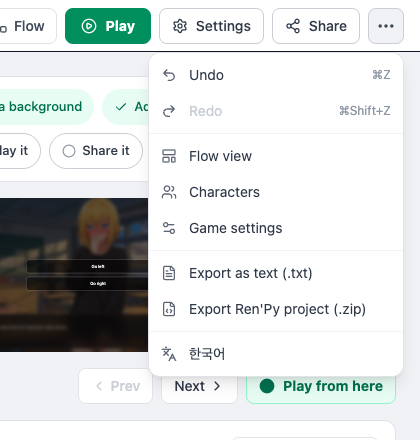
When testing reveals a serious issue, you may want to roll back to an earlier state. You can undo recent edits with Ctrl+Z (outside a text field) or with Undo in the [⋯ More] menu, but there is no way to restore an older saved version as a whole, so build habits like:
- Before a major rework, open the header's [⋯ More] menu and choose "Export as text (.txt)" to keep a copy of the script
- To keep your assets as well, use "Export Ren'Py project (.zip)" from the same menu for a local backup
Next Steps
With testing done, it is time to share your game. The next chapter covers Sharing and Deploying.