Download as Text
Download as Text
Download as text exports the current project's script content as a text file (.txt). Use it when you want to review or back up the story text outside the editor — not for distributing the game itself.
How to Use
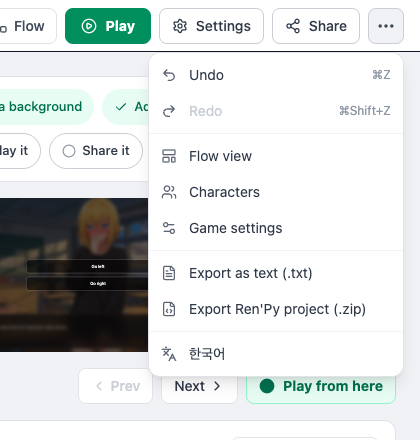
- Click [⋯ More] at the right end of the editor header to open the menu. (Both exports are inside this menu.)
- Select Export as text (.txt) from the menu.
- The browser immediately downloads a file named
ProjectTitle_script.txt.
What Gets Exported
The downloaded file contains the main blocks — Chapters, Dialogue, Choices — in a human-readable format. Inside the file, chapters appear as Label, narration as Narration, and choices as Choice. For example:
Label : start

Character Name : Dialogue text
Narration : Narration text
Choice :
 - Choice text (Jump to chapter_name)
You can open the file in any text editor to review the content, and the layout works well as a script document you can share with collaborators.
Availability
Download as text is free for everyone. If you want to export your assets as well, use Export Ren'Py project (.zip) from the same menu.
Can I Re-Import It?
Currently, there is no way to re-import a downloaded .txt file back into the editor. The downloaded file is best used for:
- A local backup of your work
- Editing or proofreading in an external text editor or word processor
- Sharing the script with collaborators
- Translation work or drafting translation copy
Usage Tips
- Back up regularly — Downloading the script after major work sessions and storing dated copies gives you something to compare against or roll back to later.
- Proofreading — Script view shows lines individually, which makes it easy to miss inconsistencies in longer passages. Reading the downloaded file in a text editor gives you a better view of the overall tone.
- File naming — The default name is
ProjectTitle_script.txt. Add a date when saving to keep multiple versions organized.