Sharing and Deploying Overview
Sharing and Deploying Overview
Novelez offers three main ways to show your finished game to others or keep it as files.
Distribution Methods at a Glance
1. Share Link
Click [Share] in the header to get a link that anyone who receives it can open in a browser to play immediately. The Novelez gallery is private to protect creators' copyright, so a share link is the only way to show your work to others. Shared games are not indexed by search engines. To share, your story needs at least 5 lines of dialogue and a choice or an ending.
2. Download as Text
Exports your script as a text (.txt) file. Handy as a backup or for external editing, and free for everyone.
3. Download Ren'Py Project
Exports a Ren'Py project, assets included, as a .zip file. Unzip it and open the folder with the Ren'Py SDK to run it — useful for continuing in Ren'Py or building your own distributable files.
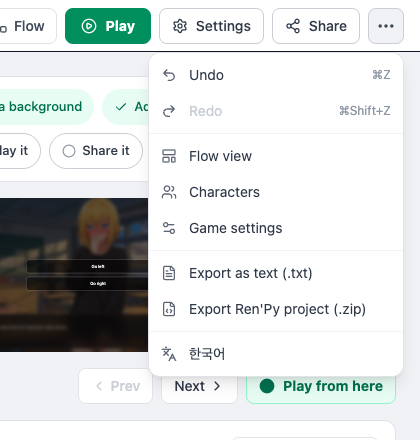
Both exports are in the header's [⋯ More] menu, as "Export as text (.txt)" and "Export Ren'Py project (.zip)."
A Pre-Release Checklist
Whichever method you use, we recommend verifying the following before sharing:
- Every path reaches an Ending properly
- Every Choice destination is correctly connected (no red warnings left at the end of chapters)
- No character or background images are missing
- Any debug lines like
{score}have been removed - Credits are filled in
- 18+ content is flagged correctly where applicable
What This Chapter Covers
The following pages cover each distribution method in turn:
- Share Link — The simplest way to share online
- Download as Text — Text backups
- Build Generation — A distribution path that is not currently offered